
All The Sims 4 Cheats
More than 140 Sims 4 cheats sorted by pack and tested by me: money, skills, careers, needs, building and much more.
8 min read
ALL THE SIMS 4 CHEATS
Were you looking for Sims 4 cheats? You came to the right place.
Were you looking for Sims 4 cheats? You came to the right place.
I, Syusims, bring you more than 140 Sims 4 cheats here, sorted by pack and tested by me beforehand.
So save this page in your bookmarks, because you will be opening it from now on every time you play The Sims 4 on your PC or console.
And speaking of CONSOLE.
Before you even start trying to memorize the codes, if there is one thing you should take from this guide, it is this:
You must learn how to open The Sims 4 Cheat Console.
Without that, none of these cheats will be of any use to you.
Because rather than cheats, they are special commands used by the developers.
So let us start at the beginning.
HOW TO OPEN THE CHEAT CONSOLE IN THE SIMS 4?
It is very simple, and I will not go on about it: just press the following at the same time on your keyboard:
To open the console on a PC press Ctrl + Shift + C
To open the console on a MAC press Command + Shift + C
To open the console on PlayStation 4 press L1 + L2 + R1 + R2
To open the console on Xbox One press LB + LT + RB + RT
Once you do, a bar will appear at the top left of the screen where you can type the cheat, but FIRST YOU MUST ENABLE CHEATS .
To enable cheats so the codes work, you must type testingcheats true and then press enter
So first copy the name of the cheat using Ctrl+C and then,
Paste the cheat into your game console with Ctrl+V.
And with that cleared up, here are the more than 140 Sims 4 cheats
Enjoy them!
Sims 4 cheats you MUST memorize
How to get 1000 free simoleons in The Sims 4 for a household?
Type kaching in the cheat console
How to get 50000 free simoleons in The Sims 4 for a household?
Type motherlode in the cheat console, and write it down.
How to move objects freely in The Sims 4?
The cheat is bb.moveobjects
How to build on locked lots in The Sims 4?
With the cheat bb.enablefreebuild you can do it and build anywhere.
How to buy a career-locked item in The Sims 4?
Type bb.ignoregameplayunlocksentitlement in the cheat console
How to get free satisfaction points in The Sims 4?
Type sims.give_satisfaction_points x (X being the amount you want) and you will give a sim X satisfaction points that you can use to buy rewards.
How to be rich in The Sims 4?
Type Money followed by the amount you want, from 0 up to 1,000,000 or even more. You must have cheats enabled to do this.
How to get hidden or debug objects in The Sims 4?
First you must use TestingCheats on, then bb.ShowHiddenObjects and finally bb.ShowLiveEditObjects for this cheat to work.
You can also use the Better Build MOD to access the game's hidden objects without using cheats
Better Build
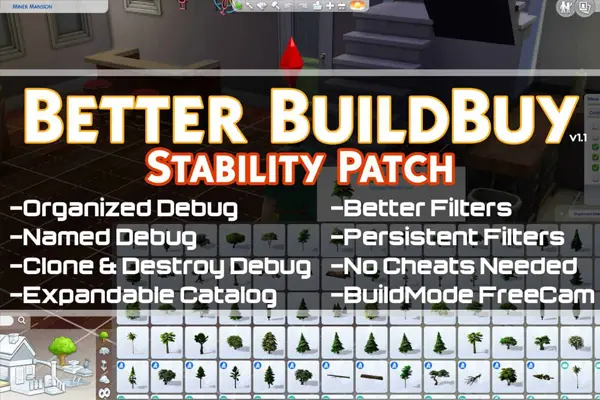
If you love building in The Sims 4, this Tmex mod will be very useful to keep everything organized and to reach locked objects
Do you love making machinima and the Plumbob gets in the way?
Add Headlineeffects off to the cheat console to make the plumbob disappear. To turn it on again, change off to on: Headlineeffects on
Want to take screenshots without the menu showing?
Take a full capture without the menu by pressing the TAB key first to get a wider view of the game and then, to capture, press the C key.
Add more personality to your sims by buying satisfaction points
Give a sim x satisfaction points that you can use to buy rewards. Sims.give_satisfaction_points 1000, for example.
Want to buy a house but your sim does not have the budget?
From world view, open the cheat console and enter freerealestate on/off so houses are free and you can move your sim or family in without any problem
Career cheats in The Sims 4
To cheat careers you must have testingcheats active (see above how to turn it on)
After activating it, enter Careers.promote X (replace the X with the name of the career) to give your sim a promotion.
If you want to take the promotion away, just enter careers.demote X
- careers.promote actor | Actor career (Get Famous expansion)
- careers.promote astronaut | Astronaut career
- careers.promote athletic | Athlete career
- careers.promote business | Business career
- careers.promote conservationist | Conservationist career (Island Living expansion)
- careers.promote civildesigner | Civil Designer career (Eco Lifestyle)
- careers.promote criminal | Criminal career
- careers.promote adult_critic | Critic career (City Living expansion)
- careers.promote culinary | Culinary career
- careers.promote detective | Detective career (Get to Work expansion)
- careers.promote doctor | Doctor career (Get to Work expansion)
- careers.promote education | Education career (Discover University)
- careers.promote engineer | Engineering career (Discover University)
- careers.promote adult_freelancer_artist | Freelancer Artist
- careers.promote adult_freelancer_agency_programmer | Freelancer Programmer
- careers.promote adult_freelancer_agency_writer | Freelancer Writer
- careers.promote adult_gardener | Gardener career (Seasons expansion)
- careers.promote adult_freelancer_agency_maker | Freelance Maker (Eco Lifestyle)
- careers.promote law | Lawyer career (Discover University expansion)
- careers.promote military | Military career (StrangerVille)
- careers.promote painter | Painter career
- careers.promote activist | Politician career
- careers.promote corporateworker | Salaryperson career (Snowy Escape expansion)
- careers.promote adult_active_scientist | Scientist career (Get to Work expansion)
- careers.promote scout | Scout (Children/Teens) (Seasons expansion)
- careers.promote secretagent | Secret Agent career
- careers.promote socialmedia | Social Media career (City Living expansion)
- careers.promote styleinfluencer | Style Influencer career
- careers.promote techguru | Tech Guru career
- careers.promote adult_writer | Writer career
Skill cheats in The Sims 4
Stats.Set_Skill_Level is the cheat code to raise your sims' skills. However, the code does not work the same way for every skill.
There are 3 types of skills: Major, Minor and Skills
There are also different levels. Some go from 1 to 10 and others from 1 to 5.
You will have to change the code depending on the skills you want to give.
The way to enter the cheat is:
stats.set_skill_level skill_bowling 3
SKILLS
- stats.set_skill_level skill_bowling (1 to 5)
- stats.set_skill_level skill_dogtraining (1 to 5)
- stats.set_skill_level skill_fitness (1 to 10)
- stats.set_skill_level major_acting (1 to 10)
- stats.set_skill_level Vampirelore (1 to 15)
- stats.set_skill_level Skill_CrossStitch (1 to 5)
MAJOR
- stats.set_skill_level Major_Archaeology (1 to 10)
- stats.set_skill_level Major_Baking (1 to 10)
- stats.set_skill_level Major_Bartending (1 to 10)
- stats.set_skill_level Major_Charisma (1 to 10)
- stats.set_skill_level Major_Comedy (1 to 10)
- stats.set_skill_level Major_DJMixing (1 to 10)
- stats.set_skill_level Major_Fabrication (1 to 10)
- stats.set_skill_level Major_Fishing (1 to 10)
- stats.set_skill_level Major_Flowerarranging (1 to 10)
- stats.set_skill_level Major_Gardening (1 to 10)
- stats.set_skill_level Major_Guitar(1 to 10)
- stats.set_skill_level Major_GourmetCooking (1 to 10)
- stats.set_skill_level Major_Handiness (1 to 10)
- stats.set_skill_level Major_Herbalism (1 to 10)
- stats.set_skill_level Major_HomestyleCooking (1 to 10)
- stats.set_skill_level Major_Knitting (1 to 10)
- stats.set_skill_level Major_Logic (1 to 10)
- stats.set_skill_level Major_Mischief (1 to 10)
- stats.set_skill_level Major_Painting (1 to 10)
- stats.set_skill_level Major_Photography (1 to 5)
- stats.set_skill_level Major_Parenting (1 to 10)
- stats.set_skill_level Major_Piano (1 to 10)
- stats.set_skill_level Major_PipeOrgan (1 to 10)
- stats.set_skill_level Major_Programming (1 to 10)
- stats.set_skill_level Major_Major_Reaping (not something you can really do, but it exists in the game)
- stats.set_skill_level Major_ResearchDebate (1 to 10)
- stats.set_skill_level Major_ResearchDebate (1 to 10)
- stats.set_skill_level Major_Robotics (1 to 10)
- stats.set_skill_level Major_RocketScience (1 to 10)
- stats.set_skill_level Major_Singing (1 to 10)
- stats.set_skill_level Major_Skiing (1 to 10)
- stats.set_skill_level Major_Snowboarding (1 to 10)
- stats.set_skill_level Major_Veterinarian (1 to 10)
- stats.set_skill_level Major_VideoGaming (1 to 10)
- stats.set_skill_level Major_Violin (1 to 10)
- stats.set_skill_level Major_Wellness (1 to 10)
- stats.set_skill_level Major_Writing (1 to 10)
MINOR
- stats.set_skill_level Minor_Dancing (1 to 10)
- stats.set_skill_level Adultminor_localculture (1 to 10)
- stats.set_skill_level minor_MediaProduction (1 to 5)
- stats.set_skill_level minor_Juicefizzing (1 to 10)
Cheats for toddlers and children in The Sims 4
The cheats for toddlers and children are different.
For toddlers the maximum level is 5 and for children it is 10.
For toddlers the code is Statistic_Skill_Toddler_
Example: Statistic_Skill_Toddler_creativity 1
While for children it is: stats.set_skill_level skill_child_
Example: stats.set_skill_level skill_child_mental 5
TODDLERS
- stats.set_skill_level statistic_skill_toddler_communication (1 to 5)
- stats.set_skill_level statistic_skill_toddler_imagination (1 to 5)
- stats.set_skill_level statistic_skill_toddler_movement (1 to 5)
- stats.set_skill_level statistic_skill_toddler_potty (1 to 3)
- stats.set_skill_level statistic_skill_toddler_thinking (1 to 5)
CHILDREN
- stats.set_skill_level skill_child_creativity (1 to 10)
- stats.set_skill_level skill_child_mental (1 to 10)
- stats.set_skill_level skill_child_motor (1 to 10)
- stats.set_skill_level skill_child_social (1 to 10)
Relationship cheats in The Sims 4
You can change the relationship level of your sims, either to raise or lower the friendship or romance bars. Here is how to do it:
modifyrelationship Sergio Ramos Anna Tanner 100 LTR_Friendship_main
You must enter the names of the two (2) sims whose relationship you want to change.
IT DOES NOT WORK WITH SIMS THAT HAVE TWO LAST NAMES OR TWO FIRST NAMES
You can change the first or last names to do the cheat, and then put the second last name back.
You can vary the friendship or romance percentage from 10 to 100, with 100 being the highest number. Negative numbers, for example -10 or -100, will make your sims enemies
- modifyrelationship Sergio Ramos Anna Tanner 100 LTR_Friendship_main
- modifyrelationship Sergio Ramos Anna Tanner -100 LTR_Friendship_main
- modifyrelationship Sergio Ramos Anna Tanner 100 LTR_Romance_main
- modifyrelationship Sergio Ramos Anna Tanner -100 LTR_Romance_main
- modifyrelationship Sergio Ramos Tito Ramos 100 LTR_SimtoPet_Friendship_main (if you have dogs and cats)
Discover University cheats in The Sims 4
Sometimes we just want to skip some important parts of our sims' lives, and for that we need a few cheats… But don't worry, nobody has to know that you bought your sim's degree.
Here are the cheats to give your sim a university diploma.
- Traits.Equip_Trait trait_University_ArtHistoryDegreeBA
- Traits.Equip_Trait trait_University_ArtHistoryDegreeBAHonors Britechester University
- Traits.Equip_Trait trait_University_ArtHistoryDegreeBAHonors Foxbury Institute
- Traits.Equip_Trait trait_University_ArtHistoryDegreeBSHonors
- Traits.Equip_Trait trait_University_BiologyDegreeBA
- Traits.Equip_Trait trait_University_BiologyDegreeBAHonors Foxbury Institute
- Traits.Equip_Trait trait_University_CommunicationsDegreeBA
- Traits.Equip_Trait trait_University_CommunicationsDegreeBAHonors Britechester University
- Traits.Equip_Trait trait_University_CommunicationsDegreeBS Foxbury Institute
- Traits.Equip_Trait trait_University_ComputerScienceDegreeBA
- Traits.Equip_Trait trait_University_ComputerScienceDegreeBAHonors
- Traits.Equip_Trait trait_University_ComputerScienceDegreeBS
- Traits.Equip_Trait trait_University_ComputerScienceDegreeBSHonors Foxbury Institute
- Traits.Equip_Trait trait_University_CulinaryArtsDegreeBA
- Traits.Equip_Trait trait_University_CulinaryArtsDegreeBAHonors Britechester University
- Traits.Equip_Trait trait_University_CulinaryArtsDegreeBS
- Traits.Equip_Trait trait_University_CulinaryArtsDegreeBSHonors
- Traits.Equip_Trait trait_University_DramaDegreeBA
- Traits.Equip_Trait trait_University_DramaDegreeBAHonors Britechester University
- Traits.Equip_Trait trait_University_DramaDegreeBS
- Traits.Equip_Trait trait_University_EconomicsDegreeBA
- Traits.Equip_Trait trait_University_EconomicsDegreeBSHonors Foxbury Institute
- Traits.Equip_Trait trait_University_FineArtDegreeBA
- Traits.Equip_Trait trait_University_FineArtDegreeBAHonors Britechester University
- Traits.Equip_Trait trait_University_FineArtDegreeBS
- Traits.Equip_Trait trait_University_FineArtDegreeBSHonors
- Traits.Equip_Trait trait_University_HistoryDegreeBA
- Traits.Equip_Trait trait_University_HistoryDegreeBS
- Traits.Equip_Trait trait_University_HistoryDegreeBSHonors
- Traits.Equip_Trait trait_University_LanguageAndLiteratureDegreeBAHonors Britechester University
- Traits.Equip_Trait trait_University_LanguageAndLiteratureDegreeBSHonors
- Traits.Equip_Trait trait_University_LanguageAndLiteratureDegreeBS
- Traits.Equip_Trait trait_University_PhysicsDegreeBA
- Traits.Equip_Trait trait_University_PhysicsDegreeBAHonors
- Traits.Equip_Trait trait_University_PhysicsDegreeBS
- Traits.Equip_Trait trait_University_PhysicsDegreeBSHonors Foxbury Institute
- Traits.Equip_Trait trait_University_PsychologyDegreeBA
- Traits.Equip_Trait trait_University_PsychologyDegreeBAHonors
- Traits.Equip_Trait trait_University_PsychologyDegreeBS
- Traits.Equip_Trait trait_University_PsychologyDegreeBSHonors Foxbury Institute
- Traits.Equip_Trait trait_University_VillainyDegreeBA
- Traits.Equip_Trait trait_University_VillainyDegreeBAHonors
- Traits.Equip_Trait trait_University_VillainyDegreeBS
- Traits.Equip_Trait trait_University_VillainyDegreeBSHonors Foxbury Institute
Sims 4 Eco Lifestyle cheats
The Sims 4 Eco Lifestyle expansion brings some new cheats.
Who says you cannot use a few “tricks” to get your sim to the top of their profession?
To have a completely eco-friendly neighborhood:
eco_footprint.set_eco_footprint_state 0
To have a neutral neighborhood:
eco_footprint.set_eco_footprint_state 1
To have an industrial or polluted neighborhood:
eco_footprint.set_eco_footprint_state 2
Change your neighborhood's action plans
To change one of the neighborhood's action plans:
Shift + click on the Public Voting Table or the mailbox and select “Instant Activate Neighborhood Action Plan”
To remove a neighborhood action plan
Shift + click on the Public Voting Table or the mailbox and select “Instant Revoke Neighborhood Action Plan”
And if you want to change the Community Center:
Shift + click on the Public Voting Table in the Community Space and select “Instant Activate Community Space Project”